
AJCC2027
Registration Fees:
Terms and Policies
Authors are kindly requested to review the AJCC MOU list before proceeding
with their registration fee payment.
You can access the official list here: [AJCC MOU List *will be updated soon*].
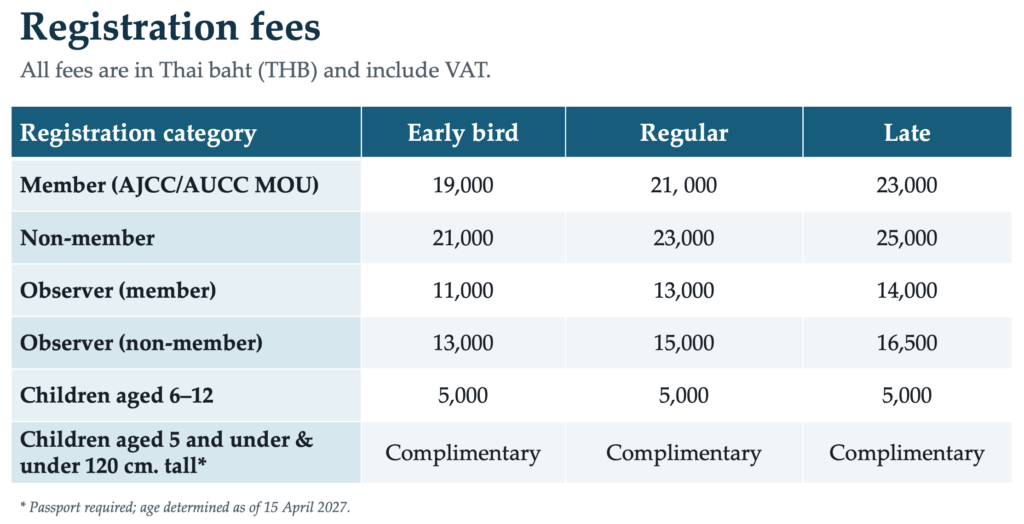
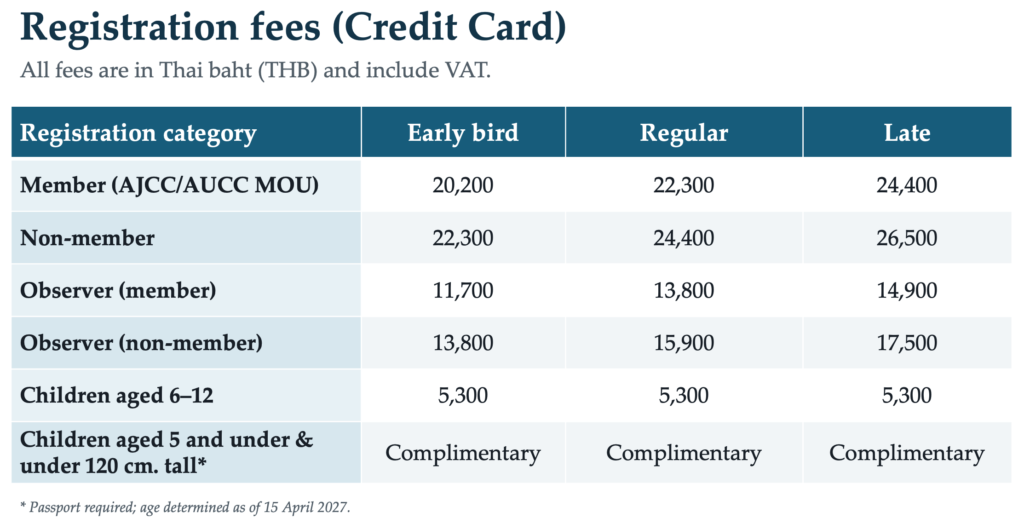
AJCC 2027 Registration Information
- Early Bird Registration: January 15 – 31, 2027
- Regular Registration: February 1 – 28, 2027
- Late Registration: After February 28, 2027
Important Registration Policies
- MOU Verification: Authors are kindly requested to review the [AJCC MOU List *will be updated soon*] before proceeding with their registration fee payment.
- Author Registration: Each paper must have at least one author register for and attend the conference. Each registration fee covers ONLY one (1) paper.
- Early Bird Policy: The Early Bird discount is strictly reserved for authors who submit their papers and receive their official acceptance letters within the specified Early Bird window. Authors who submit late or receive their acceptance notification after this period will NOT be eligible for the Early Bird rate.
- Souvenirs: Conference gifts for regular registration are subject to availability
- Participation: Registered participants are eligible to attend all conference activities.
- No-Show Policy: Any paper without a corresponding registration will be withdrawn from both the conference schedule and the selected journal.
- Registration Fees per Paper: Please note that AJCC 2027 does not offer a discounted rate for additional papers. Every accepted paper must be registered under a full and separate registration fee. Each registration fee covers ONLY one (1) paper.
Please note: The registration fee does not include the publication fee. Detailed information regarding publication fees can be found directly on the journal’s website at http://www.ajcc-conf.net/collaborative-journals/.
Methods of Payment:
AJCC makes two payment methods available:
1. Wire Transfer
Bank name: BANGKOK BANK PUBLIC COMPANY LTD. PHITSANULOK BRANCH
BICC/SWIFT code: BKKBTHBK
Bank Address: 262/24-25 Baromtrailoknart Rd., Muang, Phitsanulok 65000
City: Phitsanulok
Country: THAILAND
Account: 263-5-68694-8
Account holder: The ASIA JOINT CONFERENCE ON COMPUTING
2. Credit Card Payment
- All payments submitted online through a secure payment gateway (Opn), which can be paid by major credit cards, e.g., Visa, MasterCard, or American Express.
- The processing fee for each credit card transaction is 3.75%-5%/transaction/article.
Registration Process:
For Author:
1. Check the registration fee (see above)
2. Login into EDAS using your EDAS ID.
3. Go to menu “My…” then click “My papers“

4. Go to your manuscript that you want to register

5. Then click on the icon  to open the registration form.
6. Please provide all required information in the registration form (see below) and upload all required documents and, finally, hit the ‘SUBMIT answers’ button.


7. Please select the registration type by click on the icon 

8. Scroll down until you see the icon

9. Then, click on the icon  and then upload the bank payment slip.

10. Click on the “Choose File” Then, choose the bank payment slip. Finally, click on the “Upload file” button.

Notification
If you still can not upload the payment slip, please follow these steps.
1. Go to menu “My… > My profile“

Look at “Register for conference,” then, click on the icon 
2. Scroll down until you see “Registered, but not paid” section.

You will see these icons

3. If you pay by bank transfer (Wire), then click on the icon, 
4. You will see the following form.

Please fill in necessary information

5. Click on “Choose File” and choose the bank payment slip.
6. Click on the button “Pay by wire“
====
If you pay by credit card (you will get payment slip by email)
you can upload you payment slip when you fill in the registration form (see below).
Credit card payment
- Please select the registration type by click on the icon

- Scroll down until you see the “Credit card” icon.
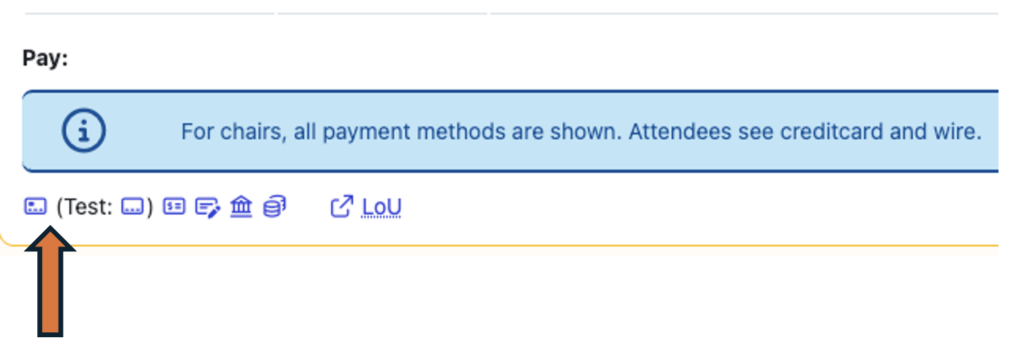
-
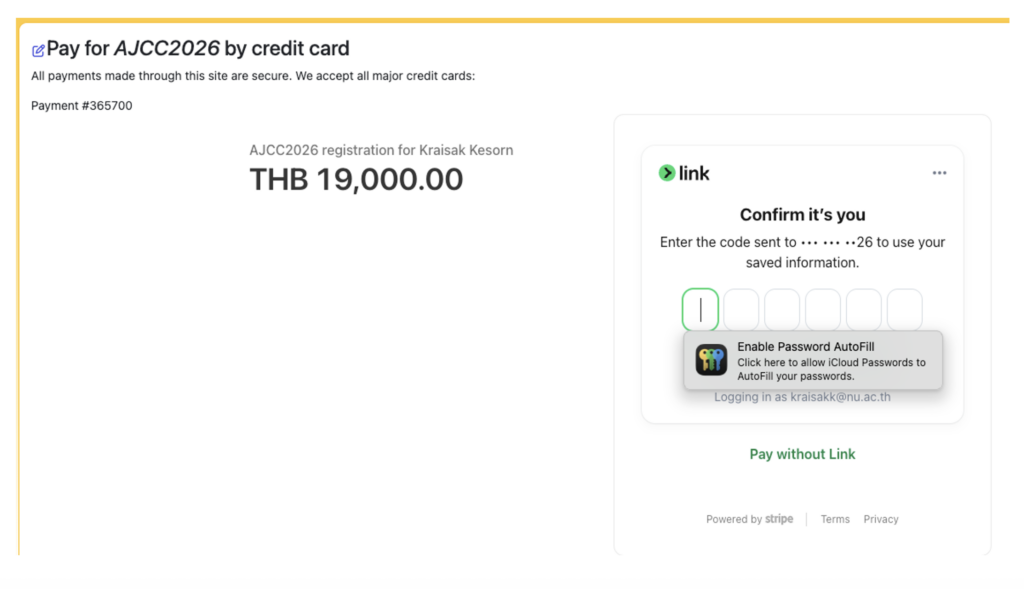
Then, the system will re-direct you to the payment page as following. You can enter your credit card information to complete the payment.
For Observer/Participant/AJCC TPC Member:
1. Check the registration fee (see above)
2. Login into EDAS using your EDAS ID.
3. Go to menu “Register“

4. At the Search box type “AJCC2026” then click on the icon 

5. Please provide all required information in the registration form and upload all required documents and, finally, hit the ‘SUBMIT answers’ button.